THE SHORT ANSWER
A missing lspci entry means Linux is not listing the expected function. It does not identify the physical cause. Preserve the inventory, identify the expected upstream port from a known-good path or platform documentation, and compare endpoint readiness, link behavior and enumeration timing before investigating DMA.
1. Separate “not enumerated” from “no driver”
Begin with the exact observation. A card can appear in the PCI inventory without a driver, bind to a driver without working DMA, or fail to appear at all. These lead to different investigations. Searching for a driver package is premature when there is no matching function in the host inventory.
| What you observe | What it establishes | Next evidence |
|---|---|---|
| Expected vendor/device IDs appear | The function was enumerated in this view | Driver binding, host resources and the actual failed operation |
| Expected IDs are absent | The current inventory does not identify that function | PCI tree, physical slot mapping and upstream-port state |
| An old entry exists but configuration is unreadable | Enumeration history and present access may differ | First access-loss error, reset/programming timeline and link evidence |
Write down the expected IDs from the generated IP configuration or a working capture. Do not rely only on the board’s marketing name: the PCI description can be generic, and a custom bitstream can change the IDs. If the machine runs a hypervisor, establish whether you are inspecting the host or a guest. A function assigned to a VM may have a different software-visible path.
2. Save the inventory before changing the system
Replace the example BDF below with the expected endpoint address. If you have no previous address, collect the inventory first and obtain the slot-to-port mapping from the platform owner. Domain numbers matter, especially on multi-domain and VMD systems; the collector accepts four- and five-digit domains.
# Read-only inventory; save output locally for your comparison.
uname -r
lspci -Dnn > pci-inventory.txt
lspci -D -t > pci-tree.txt
lspci -D -PP -nn > pci-paths.txt
python3 header7f-linux-capture.py 0000:01:00.0 > capture.json
Download and review the collector from the Console’s collector guide. Its default mode reads bounded sysfs metadata without network access. An absent target still produces JSON containing the captured PCI inventory and top-level bridge candidates. Import that JSON into the missing-card investigation.
Keep the kernel, board revision, host firmware, bitstream identifier, PCIe IP version and cold/warm startup sequence with the files. A build filename is weaker than a build identifier you can reproduce. Record whether configuration came from flash, a controller or JTAG, and whether programming took place before or after the host started.
The tree and path options are described by pciutils: lspci tree, domain, path and configuration options. An empty output file or permission error should be recorded as missing evidence, not interpreted as a clean inventory.
3. Identify the upstream port without guessing
When a function is present, its resolved sysfs path can identify its PCI ancestors. When it is absent, its old bus number cannot reliably prove which port should contain it. Firmware enumeration, switches and hotplug can change numbering. The collector therefore labels top-level bridges as candidates rather than assigning the missing card to one.
Use a saved working tree, the motherboard slot map or the board/platform manual to establish the expected immediate port. If the physical route includes a switch, identify the downstream port for this slot as well as the root-port path. A root port with several descendants is not necessarily the link partner of the endpoint.
# Only after identifying this port from a known-good path or slot map:
python3 header7f-linux-capture.py 0000:01:00.0 \
  --upstream 0000:00:01.0 > capture-with-port.json
The explicit port is user-supplied context; the tool cannot verify an absent endpoint’s physical connection from its BDF. Inspect whether the port itself exists, whether its current width is zero or unknown, and whether neighboring functions on the same path also disappeared. Zero negotiated lanes and an unavailable attribute are different observations. Neither, alone, identifies a defective card.
If you can access the FPGA debug build, capture link-up and LTSSM transitions using the signals and encodings documented for that exact core. A single “link down” LED does not replace a timed capture. AMD PG195: LTSSM, negotiated-width and speed debug options describes relevant XDMA debug options; availability varies by IP configuration and release.
4. Measure configuration, clock and reset readiness
A successful FPGA programming operation is one checkpoint. The PCIe block also needs the correct clock/reset environment and must be ready when the host discovers devices. AMD PG054: FPGA readiness during enumeration explains why a root complex may not discover an endpoint that is not ready for configuration requests.
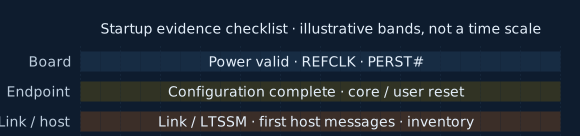
Build a startup timeline with measured events: board power valid, reference clock stable, PERST# assertion/deassertion, FPGA configuration complete, core/user reset release, link-up and the first relevant host messages. Mark which signals were measured directly and which were inferred. Observe reset polarity at the actual interface; a net name containing “reset” is not proof of its polarity or synchronization.
Illustrative bands · no timing scale or assumed order
Scroll sideways to see the full diagram
Collect board, endpoint and host events on one measured timeline. These bands show what to collect.
Details & downloads: Build one startup record across three evidence bands
- Board evidence: measure power validity, reference-clock stability and PERST# assertion/deassertion at the actual interface, with its documented polarity.
- Endpoint evidence: record FPGA configuration completion and the applicable core or user reset release. Programming success alone does not establish readiness for host configuration requests.
- Link and host evidence: record link-up or documented LTSSM evidence alongside the first relevant host messages and the enumerated inventory.
- Correlate the actual events in a measured timeline. These bands are a collection checklist; they deliberately do not draw an assumed legal power/reset waveform or prescribe an event order.
Illustrative evidence bands, not measured signals or a required sequence. Their equal spans do not establish durations, simultaneity, polarity or ordering. On the real board, place measured power, clock, reset, configuration, link and host events on a shared timeline; identify inferred or unavailable observations. Use the timing requirements for the exact FPGA, IP release, board and host. There is no universal “100 ms” patch.
Download SVG: Build one startup record across three evidence bandsWaveJSON source: Build one startup record across three evidence bands
References: FPGA missing from lspci: readiness investigation · AMD PG054: readiness during enumeration · AMD PG054: configuration and reset timing requirements · AMD PG054: scope of closed-system workarounds
Rendered with WaveDrom 3.7.0 · Open-source notices
Do not turn “100 ms” into a universal delay patch. AMD PG054: configuration and reset timing requirements discusses different timing relationships, including power-valid to reset release and configuration readiness after fundamental reset, in a specific 7 Series context. Apply the requirements for your FPGA family, IP release, form factor and host. The board’s power ramp and configuration path affect the available budget.
Useful comparisons change one condition: a known-good vendor image versus your image; documented cold startup versus a supported warm restart; or flash startup versus a documented programming sequence. If warm restart works, record the retained image and power state. It is evidence for further timing investigation, not a confirmed timing diagnosis. AMD scopes some reset workarounds to controlled systems in AMD PG054: limits of warm-reset workarounds.
5. Correlate errors, then decide whether config capture helps
Save a time-bounded kernel excerpt around the failed startup or programming event. On a system using the journal, a local collection example is:
# Replace the times with the observed event window.
sudo journalctl -k -b --since "2026-10-19 10:00:00" \
  --until "2026-10-19 10:02:00" --no-pager > kernel-window.txt
Review the file before sharing or pasting it. Include the selected address and its known port’s surrounding AER report, rather than one isolated error word. The Console attributes endpoint findings only to lines safely naming that endpoint. Port-only events and ambiguous multi-address messages do not become endpoint faults. Linux: PCIe AER reporting and recovery distinguishes hierarchy reporting and error severity.
An optional extended configuration dump is useful only for an enumerated, accessible function and a device for which such reads are appropriate. The pciutils manual notes that some devices can react badly to broader configuration reads. Choose one exact BDF; do not use a machine-wide dump as a missing-card remedy.
# Optional, after checking the device/vendor capture guidance:
sudo lspci -D -s 0000:01:00.0 -xxxx > endpoint-config.txt
# Or include bounded config bytes in the collector JSON:
python3 header7f-linux-capture.py 0000:01:00.0 \
  --include-config > capture-with-config.json
Permissions can limit the collector’s read. Missing bytes stay unknown. Reading the root port’s config cannot manufacture the absent endpoint’s config, and changing config registers is not part of this capture procedure. Sysfs resource and configuration interfaces are documented in Linux: PCI resources through sysfs.
6. Define the acceptance test and the support package
Before trying recovery, write down success: the expected IDs appear at the documented path, the driver binds, required resources exist, and the intended smoke test passes after the original startup trigger. “It appeared after reboot” is an observation; it does not establish reliable cold startup.
Keep a compact comparison: working and failed inventories, the known physical route, version identifiers, measured reset/configuration timeline, earliest relevant logs and the one condition changed. Export the Console report so the next engineer can see both its clues and its unknowns. If there is no known-good run, state that explicitly.
Rescan, device removal and reset change host/device state. They are not included in the read-only procedure above. A rescan cannot supply power or make an unready endpoint respond, and resetting a shared bridge can affect other devices. Use a board/platform-specific recovery procedure after preserving evidence. Once enumeration and access are repeatable, move on to driver mapping, submissions, completions and interrupts.
Sources and scope
Source-based guidance, checked on 19 October 2026. Placeholder BDFs and code are collection examples. Header7F has not validated these procedures across every board, platform or IP revision. The Console examples are synthetic; no physical board result is claimed. Match vendor instructions to your exact hardware and release.
- Linux: PCI resources through sysfs
- pciutils: lspci tree, domain, path and configuration options
- AMD PG054: FPGA readiness during enumeration
- AMD PG054: configuration and reset timing requirements
- AMD PG054: limits of warm-reset workarounds
- Linux: PCIe AER reporting and recovery
- AMD PG195: LTSSM, negotiated-width and speed debug options