Make something useful
Create a desk monitor with live environmental values and your own threshold or display behavior.
Build a sensor instrument you understand / BUILD 10
Live room measurements, a physical setting dial and an independent way to see the signal. Turn an FPGA learning project into something you can use on your desk.
Requires your own computer, compatible FPGA and WaveForms software, and the code and pin mapping for a 3.3 V prototype. Check what you need ↓
Explore 3 DIY project ideas ↓One Amazon selection with the planned quantities. Choose around the equipment you own.
A PIECE OF THE BUILD · PREMIUM
410-183
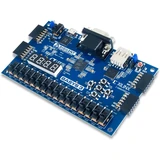
Build a real sensor instrument in programmable logic, using the board’s own display, switches and LEDs for immediate feedback.
FPGA: Artix-7 XC7A35T
View on Amazon paid link · check delivery to your locationDetails & Header7F checksA PIECE OF THE BUILD · PREMIUM
410-415
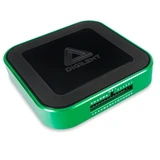
See whether a surprising reading starts at the input voltage, the serial transaction or your own controller logic.
Analog inputs: 2 differential / 14-bit
View on Amazon paid link · check delivery to your locationDetails & Header7F checksA PIECE OF THE BUILD
410-243
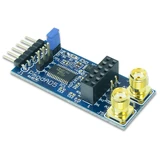
Add a separate precision ADC path for slow external signals, beyond the room sensor’s ready-made digital reading.
Converter: Analog Devices AD7193
View on Amazon paid link · confirm current offerDetails & Header7F checksA PIECE OF THE BUILD
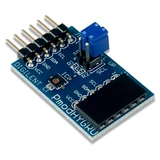
410-347
Turn the project into a room monitor with a real temperature and humidity input that can drive your own display logic.
Sensor: TI HDC1080
View on Amazon paid link · confirm current offerDetails & Header7F checksA PIECE OF THE BUILD
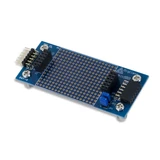
410-136
Keep a documented bus accessible for observation and give your prototype a small, stable place for low-speed connections.
Pass-through: 12-pin Pmod / all signals
View on Amazon paid link · confirm current offerDetails & Header7F checksA PIECE OF THE BUILD
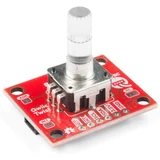
DEV-15083
Give your instrument a tactile threshold or scale control, with a button to confirm changes and a visible RGB state.
Input: 24 ticks / revolution + button
View on Amazon paid link · confirm current offerDetails & Header7F checksA PIECE OF THE BUILD
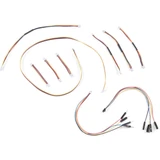
KIT-15081
Bridge the Twist’s small polarized connector to the documented 0.1-inch header or breadboard route in this FPGA project.
Kit quantity: 10 cables / one kit
View on Amazon paid link · confirm current offerDetails & Header7F checksA PIECE OF THE BUILD
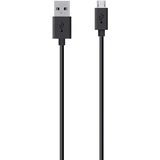
F2CU012bt04-BLK
Complete the Basys3 programming and power connection with a real data lead that the board’s retail package does not include.
Ends: USB-A male / Micro-B male
View on Amazon paid link · confirm current offerDetails & Header7F checksCreate a desk monitor with live environmental values and your own threshold or display behavior.
Explore a setting with a rotary dial, button and visible feedback instead of rebuilding for every new number.
Keep analog observations, serial transactions and your RTL revision close enough to compare deliberately.
THE REASON TO BUILD IT
The satisfying part of a sensor project is making it useful: a number you can read, a setting you can change and a clear response. Basys3 already supplies the display and LEDs. Add a real humidity and temperature sensor, then give the interface a dial so the prototype starts behaving like something you designed for a person.
The second step is earning trust in the result. A separate ADC creates a deliberate path for slow analog inputs; Analog Discovery3 lets you observe the input and the digital conversation in WaveForms. The breakout and the correct cables make those connections accessible. You gain a small workshop for turning an idea into a visible, explainable behavior.
IMAGINE WHAT YOU COULD MAKE
Small inventions with a useful purpose.
Choose the idea that earns a place on your bench.
Original DIY concepts inspired by maker builds. You supply the code and validation. Shopping links open in a new tab; Amazon links are paid links.
DIY CONCEPT / 01
Turn the Basys3 board and HYGRO sensor into a live temperature-and-humidity desk readout, using the board’s existing display and LEDs. The USB programming lead closes the first-session connection. Your product idea: a readable room-condition indicator with a named, reproducible source for every value.
Header7F can help
Reproducible RTL guide Keep the controller revision, constraints, sensor settings and exact failing condition together.
Timing diagram gallery If your controller uses AXI, compare its internal handshakes with labelled synthetic examples; I2C capture remains in vendor tools.
A design concept for a 3.3V prototype, not a supplied bitstream or calibrated environmental monitor. Adapt the source project’s principles to Basys3; its original Arty-S7 files are not drop-in replacements.
DIY CONCEPT / 02
Use the PmodAD5 for a slow external analog channel and the Analog Discovery3 for independent observation of a bounded test input. Give that investigation accessible, labelled connection points with the PmodBB. Your product idea: a compact input-check station that shows the input condition beside the acquired result.
Header7F can help
Reproducible RTL guide Save the input range, reference, gain, settling, pin map and actual WaveForms capture with the controller revision.
AXI trace examples For a custom AXI acquisition front end, learn the documented example-trace checks separately from analog measurement.
Low-voltage, slow-signal concept. Configure and verify gain, reference and common-mode range before injecting any signal; ADC power-up gain 128 is not a general-purpose input setting. No accuracy or noise-floor result is claimed.
DIY CONCEPT / 03
Make an instrument setting tactile with the Qwiic Twist and the Qwiic cable kit. A turn proposes the next threshold, the button confirms it and color shows the chosen state. Your product idea: a small front panel that makes an FPGA prototype understandable without a keyboard.
Header7F can help
AXI address and data guide If you expose the setting through an AXI-Lite register, plan independent address/data arrivals in your own RTL.
Reproducible RTL guide Record the I2C address, pull-up arrangement, pin mapping and exact turn/button sequence around a reported fault.
A3.3V user-interface concept. Implement the Twist register protocol for your controller; SparkFun’s Arduino examples explain device behavior and are not FPGA firmware. A knob and LED are not a safety or motor-control system.
These projects inspired the approach. The concepts above are Header7F adaptations, not tested reproductions of these builds.
EVERY PIECE HAS A JOB
Eight distinct purchases, including one complete Qwiic cable kit. Reuse suitable equipment you own. You supply the supported computer, software, controller design and any wiring needed by your chosen prototype. Check seller, exact model and delivery before ordering; premium Amazon items had a destination restriction at review.
Make the behavior yours.
The board gives your sensor logic a physical home with useful controls and a display already fitted. You can change how samples are collected, filtered and reported without adding another screen.
Program your own supported design. The USB Micro-B data cable is a separate selected item; the board’s retail package excludes it.
Before choosing itAn owned supported computer, AMD Vivado installation and board constraints are required. Write or adapt the I2C/SPI controller and display logic. Use the selected USB-A to Micro-B data lead at PROG, check USB power budget, and keep Pmod I/O at 3.3V.
With Header7FPlan a useful timing observation →
This USB development board is not a PCIe endpoint. Header7F does not program it, read its JTAG analyzer, decode I2C/SPI or certify your RTL. Internal AXI examples apply only if your design actually includes that interface.
Manufacturer specificationsAmazon delivery was restricted at the checked destination on 20 October 2026. Confirm delivery to your own destination before including this exact model. This does not establish global stock status.
Also check DigiKeyExact Digilent 410-183 supplier option, listed in stock at review. Separate DigiKey purchase; confirm current offer and regional delivery.
Make the invisible part visible.
Independent analog and digital observations help separate a changing sensor signal from a software or RTL mistake. The same instrument can supply a bounded test waveform when the ADC input settings are understood.
The package already supplies its USB-C cable, flywire assembly and headers. Reuse them; no duplicate harness or cable purchase is listed.
Before choosing itUse Digilent WaveForms on a supported owned computer and the included USB-C cable, flywire harness and headers. The host must meet the instrument’s power requirements. Match signal/ground connections and input limits; keep the Basys3 on its own documented USB power route.
With Header7FPlan a useful timing observation →
Use WaveForms for real acquisition and protocol decoding. Header7F does not control this instrument or import arbitrary WaveForms captures. Maximum advertised analog bandwidth needs the optional BNC adapter, which is not selected here; this is not a PCIe compliance tester.
Manufacturer specificationsAmazon delivery was restricted at the checked destination on 20 October 2026. Confirm delivery to your own destination before including this exact model. This does not establish global stock status.
Also check DigiKeyExact Digilent 410-415 supplier option, listed in stock at review. Separate DigiKey purchase; confirm current offer and regional delivery.
Give slow signals a deliberate path.
A configurable differential converter gives the project a measurement channel whose reference, gain and settling behavior you can study. It serves a different job from an environmental sensor that returns finished digital values.
Configure and verify the input range first. Start with a bounded low-voltage bench signal; no sensor calibration or measurement accuracy is promised.
Before choosing itUse the manual’s SPI pin map at 3.3V and explicitly configure reference, gain, channel and conversion timing. The power-up gain is 128, with a narrow input range. Bound the analog stimulus to the configured range and common-mode limits before connecting it.
With Header7FPlan a useful timing observation →
24-bit resolution is not guaranteed system accuracy or 24 noise-free bits. Settling, reference, gain and wiring matter. Header7F cannot read ADC samples or validate the analog circuit; use WaveForms and your own acquisition code for measurements.
Manufacturer specificationsExact Amazon identity checked 20 October 2026. Check the selected model, seller, condition, current offer and delivery to your destination before ordering.
Give the instrument something real to notice.
Humidity and temperature change slowly enough to make a satisfying first live display. The digital sensor lets you focus on reliable transactions and clear reporting before building a separate analog sensor front end.
Use ambient, non-condensing conditions within the manual. The board’s existing display and LEDs can report the result without another display module.
Before choosing itFollow the HYGRO reference manual’s SDA/SCL and power pin mapping. Use 3.3V power and pull-ups for Basys3, common ground, a correctly oriented port and controller logic that waits for conversion completion. Check the bus pull-up network before adding another I2C device.
With Header7FPlan a useful timing observation →
This measures local ambient conditions at the module. It does not measure component junction temperature or certify storage conditions. Header7F does not read the sensor, decode its I2C traffic or verify its accuracy.
Manufacturer specificationsExact Amazon identity checked 20 October 2026. Check the selected model, seller, condition, current offer and delivery to your destination before ordering.
Leave room to ask what happened.
An accessible prototype area makes it easier to label a bus, expose a test point and change one connection deliberately. That matters when a sensor reading and a waveform need to be compared at the same physical point.
One170-point breadboard is already included. This selection does not list another breadboard; your chosen test-point wiring still has to be built and checked.
Before choosing itCheck the module schematic, pin orientation and jumper blocks before connection. Plan accessible male header points for the AD3’s female flywires using its included headers, with power removed. The prototyping area needs appropriate wiring or soldering for your chosen route.
With Header7FPreserve the actual wiring map →
This is a passive prototype carrier, not an active signal adapter or automatic wiring map. A fitted breadboard does not connect itself to every Pmod signal. Header7F cannot verify the connections, shorts, pull-ups or voltage levels.
Manufacturer specificationsExact Amazon identity checked 20 October 2026. Check the selected model, seller, condition, current offer and delivery to your destination before ordering.
Make a setting feel like a setting.
A physical dial makes thresholds and display scales easy to explore without rebuilding for every number. Its built-in button and color feedback can help your interface distinguish a proposed value from a confirmed one.
This 3.3V I2C module needs the separately selected Qwiic cable kit and your own controller logic. No soldering is needed at the Twist when its connector is used.
Before choosing itThe Twist’s Qwiic connector does not mate directly to Pmod. Use the selected cable kit’s header or breadboard lead, map3.3V/GND/SDA/SCL explicitly, and implement its register protocol in your FPGA design. Check I2C pull-ups and address conflicts; default address0x3F.
With Header7FPlan a useful timing observation →
This is an encoder input, not a motor control, analog potentiometer or protection circuit. SparkFun’s Arduino examples explain the device protocol; they are not drop-in Basys3 RTL. Header7F does not read or configure the knob.
Manufacturer specificationsExact Amazon identity checked 20 October 2026. Check the selected model, seller, condition, current offer and delivery to your destination before ordering.
Close the connector gap.
The two jumper styles make the rotary module connectable to ordinary header and breadboard layouts. The remaining Qwiic leads stay available for later routing rather than becoming extra entries in your shopping list.
One complete KIT-15081 is selected, quantity1. It includes all 10 leads; none is sold again as a separate item in this bundle.
Before choosing itChoose the kit’s female-jumper lead for suitable male test points or its male breadboard lead for a checked female header/breadboard route. Match black GND, red 3.3V, blue SDA and yellow SCL to the actual Pmod pinout; the Qwiic end alone is polarized.
With Header7FKeep connector and pin mapping explicit →
A Qwiic cable is passive and does not translate voltage or rearrange the Pmod pinout. The kit includes 10 leads as one product; buy one kit and do not add its individual leads as separate bundle products. Header7F does not test cable continuity.
Manufacturer specificationsChecked 20 October 2026: the exact KIT-15081 listing offered Add to cart and delivery dates; no explicit stock count was shown. One complete ten-cable kit, quantity one. Confirm the current seller and delivery offer.
Make the first connection a complete one.
A charge-and-sync lead carries the data that programming needs as well as board power. Selecting the missing Micro-B connection avoids discovering an unpowered or undetected board at the first session.
One black 4ft cable is selected. It serves Basys3; the measurement instrument’s included USB-C lead stays with that instrument.
Before choosing itAn owned computer needs a suitable USB-A port. Connect the Micro-B end to Basys3’s PROG/J4 port, use the board’s documented USB power setting and confirm board detection in AMD/Digilent tools. The AD3 uses its own included USB-C cable.
With Header7FKeep a known-good programming baseline →
This passive cable does not add a PCIe interface or guarantee programming, current capacity for every loaded design or a working USB port. Header7F does not enumerate USB devices, inspect cable wiring or program the board.
Manufacturer specificationsExact Amazon identity checked 20 October 2026. Check the selected model, seller, condition, current offer and delivery to your destination before ordering.
YOUR FIRST USEFUL RESULT
One room reading on the board’s display, a working dial setting and a saved, labelled observation of your own slow signal.
Start with the board’s documented programming flow and one 3.3V sensor. Show a value on its existing display before combining the remaining modules.
Map the dial to an explicit threshold or scale in your own design, and check the physical bus connections and pull-ups before using them together.
Compare a bounded input and your acquired result in the instrument’s own software. Save revision, pin map, configuration and the actual capture beside one reproducible case.
Header7F’s diagrams are labelled synthetic AXI examples. Use vendor tools for these boards and real WaveForms acquisition; keep analog measurements and internal protocol checks distinct.
A CONSIDERED PURCHASE
For learners and makers ready to write or adapt FPGA logic on an owned supported computer. This is a programmable prototype with separate measurement software, not a prebuilt appliance or a PCIe card.
No. This is a hardware selection with concise project ideas. You write or adapt Basys3 logic, constraints and the modules’ register protocols. The official tutorials are inspiration and reference; they do not certify this exact combined build.
They serve different inputs. HYGRO returns digital temperature and humidity readings over I2C. AD5 accepts separately wired analog signals and returns conversions over SPI. Neither replaces the other’s job.
Keep Basys3 on its own documented USB programming/power route and AD3 on its own supported USB route. Confirm the FPGA design and attached modules fit the available power budget. Do not join their supply outputs or assume an instrument output is the right board supply.
WaveForms and the FPGA vendor tools handle actual device programming, acquisition and protocol decoding. Header7F provides timing explanations, AXI trace examples and a reproducibility method. It does not connect to the boards or import arbitrary instrument files.
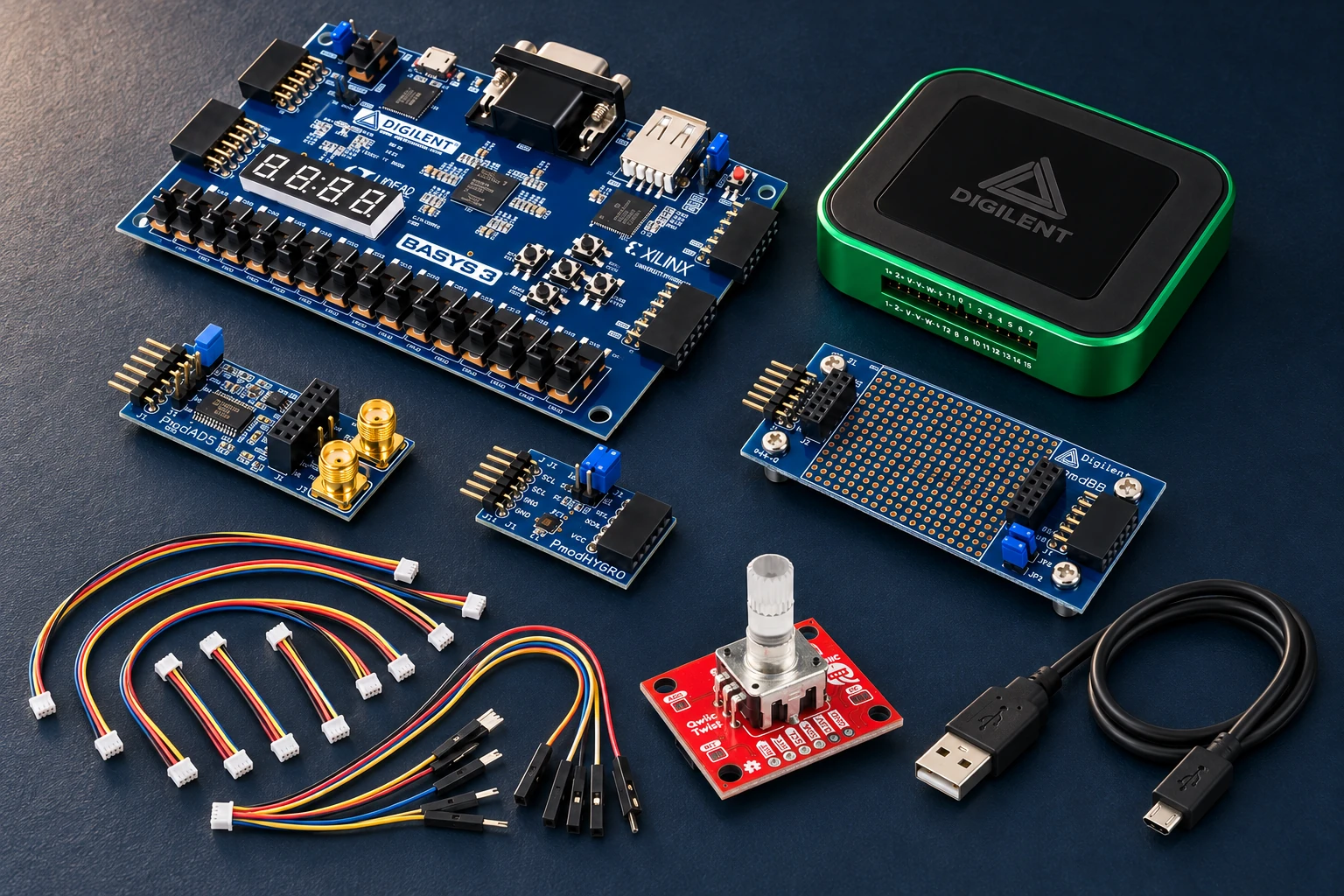
No. The bundle scene is an AI illustration based on original product photos. The recurring maker is an AI-created fictional character. Wiring, firmware compatibility and actual measurements must be checked on your own setup.
This AI-arranged illustration shows a planned kit using product appearance references. Compare the original photos and the exact listing variant. It does not document an assembled, tested or compatible Header7F lab.
All scene products remain visible and individually linked. Retailer offers and regional delivery can change. Tools interpret supported supplied evidence; handling accessories do not produce diagnostic data.
As an Amazon Associate I earn from qualifying purchases. Amazon links are paid links; check the exact model, seller, price and delivery availability on Amazon.
← Explore the other builds